workerman 聊天初探
学习使用websocket链接 进行网页的实时聊天
首先需要下载一个 workerman 点这里
就是先使用前段画一个聊天窗口,然后进行聊天的模拟
如图
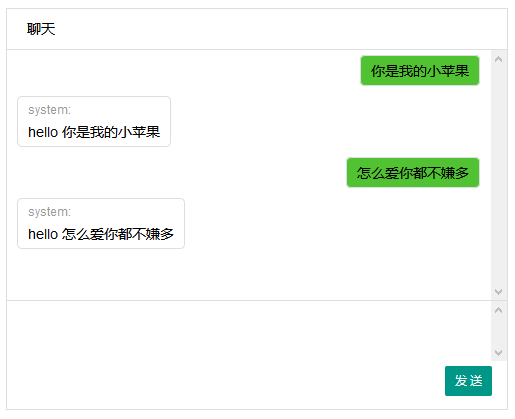
css代码
.layui-box{width:500px; height:400px; position:absolute; left:50%; margin-left:-251px; top:50%; margin-top:-201px; border:1px solid #dedede;}
.layui-title{line-height:40px; padding-left:20px; border-bottom:1px solid #dedede;}
.msg-list{overflow-y:scroll; height:250px;border-bottom:1px solid #dedede;}
.msg-item{border:1px solid  #dedede; padding:5px 10px; border-radius:5px;margin:5px 10px; float:left; font-size:14px; max-width:350px;}
.user-name{font-size:12px; color:#999; display:block;margin-bottom:5px;}
.user-msg{}
.clear{clear:both}
.my-msg{float:right;background:#51C332}
.msg-sendbox{height:40px;padding:10px; overflow-y:scroll}
.layui-btn{float:right; margin-right:15px; margin-top:5px;}
html代码
<div class="layui-box">
    <div class="layui-title">聊天</div>
    <div id="some_id" class="msg-list">


    </div>
    <div class="msg-sendbox" contenteditable="true">

    </div>
    <div class="layui-btn layui-btn-sm" onclick="sendmsg()">发  送</div>
</div>
js代码
layui.use('layer',function(){
    $ = layui.jquery;
});
ws = new WebSocket("ws://127.0.0.1:2000");

ws.onmessage = function(e) {
    msgItem = '<div class="msg-item">\
                <span class="user-name">system:</span>\
                <div class="user-msg">'+ e.data+'</div>\
                </div><div class="clear"></div>';
    $(".msg-list").append(msgItem);
};
  function sendmsg(){
    msg = $.trim($('.msg-sendbox').html());
    if(msg.length ==0){
        layer.msg("不能发送空文字")
        return false;
    }
    ws.send(msg);
    msgItem = '<div class="msg-item my-msg">\
        <div class="user-msg">'+msg+'</div>\
        </div><div class="clear"></div>';
    $(".msg-list").append(msgItem);
    $('.msg-sendbox').html('');
  }
到此前段结束 请将上面的代码放入一个html页面中
然后 写一个php程序 ws_test.php 照抄的
use Workerman\Worker;
require_once __DIR__ . '/workerman/Autoloader.php';

// 注意:这里与上个例子不同,使用的是websocket协议
$ws_worker = new Worker("websocket://0.0.0.0:2000");

// 启动4个进程对外提供服务
$ws_worker->count = 4;

// 当收到客户端发来的数据后返回hello $data给客户端
$ws_worker->onMessage = function($connection,$data)
{
    global $ws_worker;
    foreach($ws_worker->connections as $conn){
        $conn->send('hello ' . $data);
    }
    // 向客户端发送hello $data

};

// 运行worker
Worker::runAll();
最后cmd运行一下
php ws_test.php start
运行一下吧!